 Sonic Pixel
Is EmDash the Better Option for Your Small Business Site?
If you run a small business and are deciding what your next website should be built on, EmDash may be a better option for you than WordPress. This post walks through what you would get and what you would give up, in plain terms, so you can decide whether it fits your site.
EmDash is a free, open source content management system from Cloudflare. Its makers describe it as a spiritual successor to WordPress: you still get pages, posts, a media library, menus and a familiar admin to edit them in. Under the hood it is built on Astro, a modern way of building websites, and it runs on Cloudflare's global network instead of a single rented server.
You keep control of your search rankings
Moving away from WordPress does not mean giving up control over how Google sees your site. Every page in EmDash has its own SEO panel, where you can set:
- the title and meta description shown in search results (the panel counts the characters for you),
- the image used when the page is shared on social media,
- a canonical URL, which tells search engines which copy of a page is the original, and
- a switch to hide the page from search engines.
EmDash also builds your sitemap and robots.txt automatically, adds structured data (the behind-the-scenes labels search engines read), and has a redirects manager in the admin, along with a log of addresses visitors tried that do not exist, so old links can be pointed somewhere useful. Because we write your site's templates ourselves, we can add any other structured data your business needs.
When we move a site, we keep what already ranks. Moving Kantan Health off WordPress (to a static Astro site, built on the same framework as EmDash) kept all 5,289 of its existing redirects, along with its titles, canonicals and sitemaps.
Your pages load much faster
A typical WordPress page is put together by the server every time someone visits: it runs PHP, asks the database for the content, and then sends the result. Our EmDash and Astro sites are served from Cloudflare's network, close to each visitor, and send far less code to the browser. Pages that rarely change can be built ahead of time and sent as ready-made files.
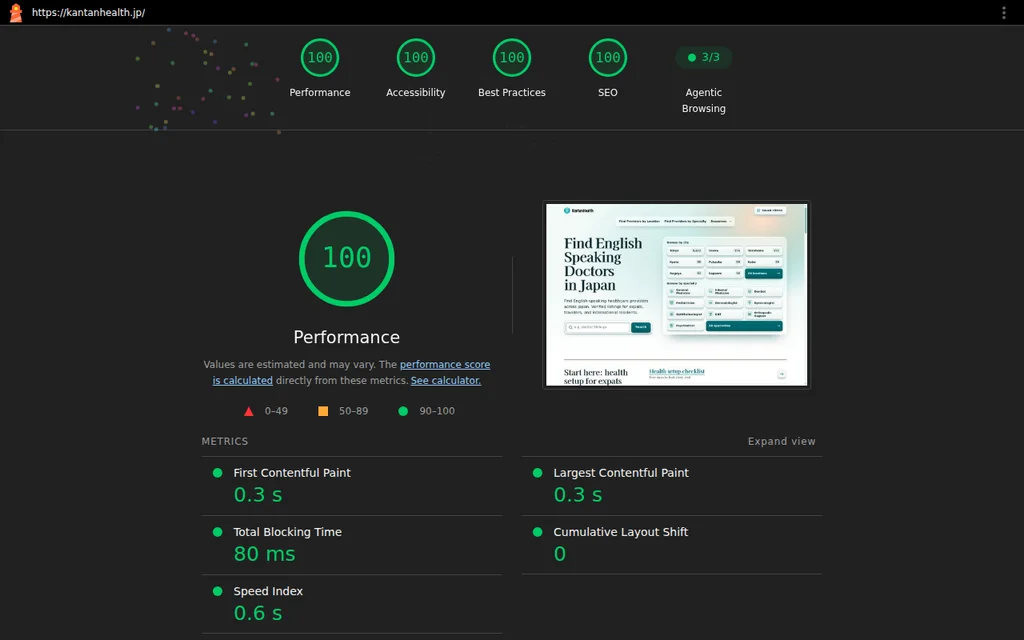
Google's free Lighthouse tool scores a page out of 100 for Performance, Accessibility, Best Practices and SEO. We ran it on our own sites on 29 November 2026:
- kantanhealth.jp (static Astro): 100 in all four categories on the desktop test. On Lighthouse's mobile test, which simulates a slow phone connection, Performance scored between 72 and 74 across three runs, and the other three categories stayed at 100.
- aksharayogapeetham.com (EmDash): 99 for Performance, 96 for Accessibility and 100 for both Best Practices and SEO on the desktop test, the same in all three runs.
Your hosting costs less
Cloudflare's free Workers plan includes 100,000 requests a day, which is more than enough for many small business sites. When Kantan Health moved off WordPress, its hosting went from $12 a month to $0.
An EmDash site does more than a static one, because it has an admin and a database behind it. Some features, like the sandboxed plugins described below, need Cloudflare's paid Workers plan, which starts at $5 US a month for the whole Cloudflare account rather than per site, with charges only for usage beyond its included allowances.
You have far less to worry about on security
On WordPress, every plugin runs with full access to your site. One plugin that falls behind on updates can let an attacker in, which is why WordPress sites need someone checking and installing updates every week.
EmDash is built differently:
- Sandboxed plugins. Plugins installed from the admin run in their own isolated space. They cannot see the site's secret keys or files, and they only get the permissions they ask for and you approve, such as "read your content" or "talk to this one other website".
- Fewer moving parts. There is no PHP, no password login page for bots to hammer, and no pile of third-party plugins. The few features a small business site needs, we build into the site itself, and they are reviewed like the rest of its code.
- No passwords to steal. Logins use passkeys by default (more on that below).
The software still gets updated, but that is part of our regular maintenance, not a weekly race to patch plugins before someone finds the hole.
You can still edit it easily
You log in at your own site's address and get a clean admin. From there you can:
- edit pages and posts in a writing editor with headings, lists, links, images, galleries, tables and video (type / to add a block),
- save a draft while visitors keep seeing the published page, then publish when you're ready, or schedule it for later,
- go back to an earlier version of a page if you change your mind,
- send a preview link so someone can check a draft before it goes live,
- upload photos and documents to the media library by dragging them in, keep them in folders, and see which pages use an image before you replace or delete it,
- change menus and other editable areas of the site.
If more than one person edits the site, EmDash has five levels of access, from Subscriber up to Admin. An Editor can manage all the content without being able to change settings or plugins, for example. You can invite people by email, and an invite link works once and expires after 7 days.
EmDash also comes ready for AI assistants. If you use one, such as Claude, it can draft, edit and schedule content in your site with the same permissions as a person on your team. You never have to use it.
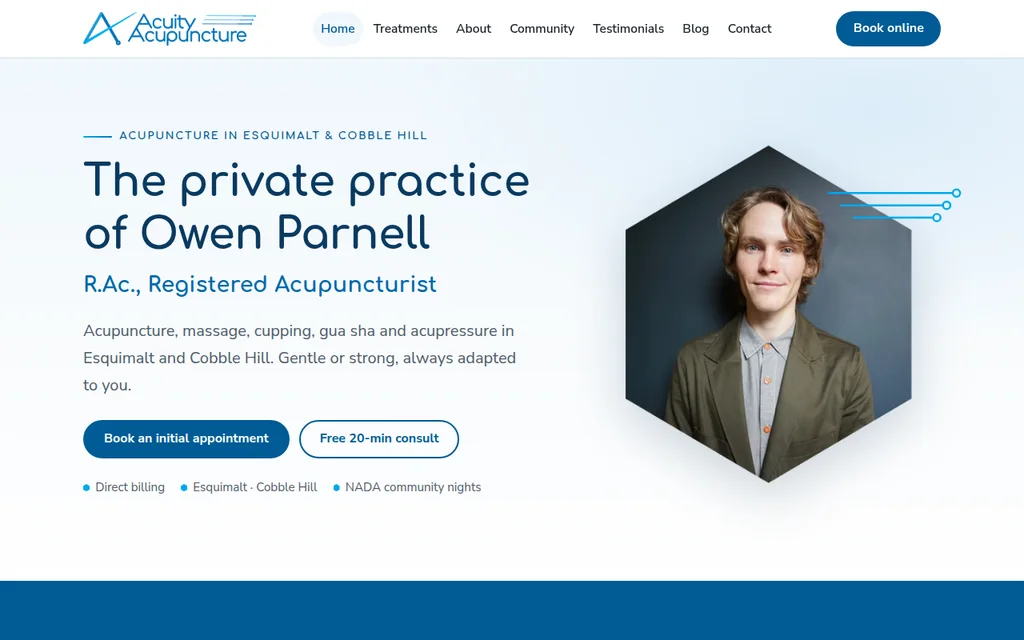
Here is what the admin looks like on a site we built for an acupuncture clinic:
You log in without a password
EmDash does not use passwords by default. It uses passkeys: you sign in the same way you unlock your phone or computer.
- On a Mac or iPhone, that is Touch ID or Face ID.
- On Windows, it is Windows Hello: your face, fingerprint or PIN.
- On Android, it is your fingerprint or screen lock PIN.
Your passkey can sync between your devices through iCloud Keychain, Google Password Manager, or a password manager such as 1Password or Bitwarden, so a new phone or laptop does not lock you out.
Passkeys are much harder to steal than passwords. There is no password to guess, reuse or leak, and a passkey only works on your real site's address, so a fake login page made to look like your site cannot trick you into handing it over.
If you are on a device without your passkey, you can sign in by email instead. EmDash sends a link that works once and expires after 15 minutes. The link only signs you in when you press Continue on the page it opens, so an email security scanner that opens links in advance cannot use it up. Email login needs the site's email sending set up, which we do as part of the build.
Two other options are there if you want them:
- Sign in with Google, Microsoft or GitHub. These can be turned on alongside passkeys. EmDash only connects one of these accounts to your existing login when it confirms the same email address.
- Cloudflare Access, for teams. A business that already manages staff logins in one place can put the admin behind Cloudflare Access, so people sign in with their company account. When it is on, it replaces the other sign-in methods.
The honest downsides for you
EmDash is not right for everything, and you should know the trade-offs.
- No huge plugin marketplace. WordPress has a plugin for almost anything. EmDash has its own plugin directory, but it is small by comparison.
- Fewer ready-made themes. You cannot pick a theme off the shelf and have a site by the afternoon. We design and build each site, so this rarely matters to our clients, but it does mean the design comes from us.
- It is newer software. EmDash is at version 1.6. It has fewer years behind it than WordPress, and far fewer developers know it, so you depend more on us (or another developer who knows it) for changes to the design or features.
- It is not a page builder. You edit the words, images and menus. Moving sections around or changing the layout is a change we make in the site's code.
In practice, a brochure site for a small business needs very little of what those WordPress plugins do. The usual list is a contact form, a photo gallery, a booking button that links to your booking system, and sometimes a blog. We build those into the site, and they stay small, fast and safe.
When WordPress is still the right choice for you
We still build and look after WordPress and WooCommerce sites, and sometimes we recommend them:
- Big online stores. A store with a large catalogue, complex shipping or many payment options is better served by WooCommerce, or by Shopify, which we also build on.
- Sites that depend on many plugins. Memberships, online courses, complex booking systems and similar features are mature on WordPress, and rebuilding them for EmDash would cost more than it saves.
- Teams who already know WordPress. If your staff are comfortable with WordPress and a page builder, and the site works well, switching may not be worth it.
EmDash and Astro sites you can look at


If EmDash sounds like the better option for your site, or you are not sure yet, get in touch and we will tell you honestly whether it fits.